Experiment Execution
Executing the Experiment on Emulab cluster
Continuing with our example, perform the following preliminaries by substituting the values for parameters, and , as provided in Step 2:
<code>ssh node1.
cd /scripts
</code>
Finally, the experiment can be run one of two ways (please read before choosing which script is best for your personal preference):
<code>./run.sh
</code>
Running the command may result in the following activity in terminal:
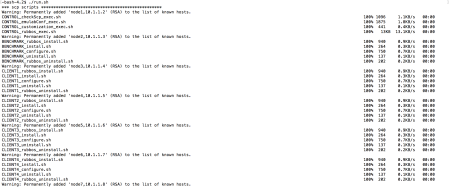
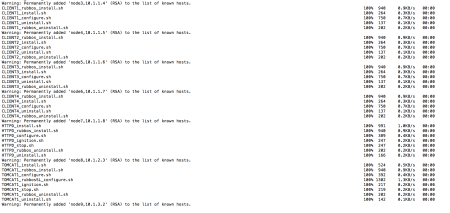
While executing an experiment in this manner works, there a few downsides to executing an experiment this way. These limitations are:
-
Error messages or standard output will not be captured for future analysis. This makes the verification that the experiment ran “correctly” rather difficult as debugging would require examining terminal-based output.
-
Secondly, since this command is executed over an SSH session, it could timeout if the experiment execution time exceeds the default session timeout, causing an abrupt termination of the experiment prior to its natural completion. These problems are resolved by using the following, alternative method.
Running experiments under a screen session mitigates these problems. [Ensure the Linux program screen is installed prior to executing an experiment with this method.] The Linux program, screen, enables scripts to be executed independent of an active ssh session. To run an experiment under screen, use the following:
<code>./run_screen.sh
</code>
This script creates a new session, navigates to the experiment at the provided path, runs the experiment while storing the output, and detaches the screen from your current shell. The script also saves all output to a log file in the specified directory.
To re-attach to the screen session, a user can run the following command and replacing with the Experiment Name value from Step 1:
<code>screen –r
</code>
Experiment Organization
In general, every generated experiment adheres to a canonical structure.
<code>/proj/infosphere//rubbos/rubbos_yasu/
</code>
-
-
is the top-level directory that holds all of the generated experiment artifacts. In fact, this line corresponds to the value supplied for the OUTPUT_HOME parameter in the Experiment XML
-
This acts as a de facto reference point for many other scripts during the installation and configuration of the environment’s nodes and benchmark
-
It must be accessible to the environment where the experiment will be run, so the associated scripts and configuration can be executed
-
Shared Structures. There are several shared directories, i.e. all experiments reference these directories and must exist under
../rubbos_yasu, i.e. in the context of OUTPUT_HOME, these structures must be at the same level in the path as the . These directories are:-
emulab_files: file system configuration for
fdisk -
tomcat_files: standard startup and shutdown scripts
-
apache_files: static html files for the benchmark
-
rubbos_files: benchmark source code for the Client generator and Application logic (Servlets)
-
Note: There can be others such as postgres_files and a directory for marmot; however, these are only necessary for running experiments with postgres DBMS and the PRObE cloud respectively.
-
-