Experiment Generation
Create experiment on Emulab cluster
Create a new experiment on Emulab by selecting the Experimentation drop down at the top of the website and select Begin an Experiment.
Fill out the the form accordingly.
-
Make note of the Experiment Name you provide; this value will be needed later to generate the experiment’s artifacts
-
Naming Convention for Experiment Name : use lowercase letters and/or numbers in the name, no spaces or special characters, including underscore (“_”)
-
This form also asks you to provide an .NSFile
-
This input file specifies the network topology, machine types and OS images for the experiment
-
Note: a sample .NSfile can be found here.
- To execute the 1-1-1-1 topology you can copy and paste the code given here into a text editor. Note: if you are using a Mac then use Sublime, Vim, or TextWrangler- do NOT use TextEditor.
-
For this example, the .NSFile needs to include 10 nodes, corresponding to: 1 Control node, 1 Benchmark node, 4 Client node, 1 HTTPD node, 1 Tomcat node, 1 C-JDBC node, and 1 MySQL node.
Comment: In this example, all of the nodes are on one local area network (LAN). This can be changed by including more LAN’s in the specification and connecting the desired nodes to a particular LAN.
Note: Node locations may be changed in the event that nodes of one group area all being used. Example: if all the d710 nodes are in use, pc3000 may be used instead. Please refer to “Emulab tips” for how to view open nodes and other general Emulab related questions.
Describing the Experiment by editing/completing Experiment XML
We use an XML file as a basis for generating all experiment artifacts. This XML file contains various environmental and experimental parameters, for example:
-
username and groupname for executing the experiment
-
workload, i.e. number of concurrent user requests
-
number of nodes (servers) and the component software (application software) to install on each
-
monitoring to activate
In short, these parameters control the software, topology, workload and monitors used during the execution of a system experiment. As such, it functions as a de facto experiment specification.
To begin, perform the following commands:
<code>cd /proj/Infosphere//common/experiment_xml
cp RUBBOS-1111-EMULAB-DEFAULT.xml RUBBOS-1111-EMULAB-username.xml
</code>
Open and edit your RUBBOS-1111-EMULAB-username.xml
Several default parameters need to be changed to execute our example:
-
EMULAB_EXPERIMENT_NAME Complete this value using the Experiment Name value from above (step 1) using the following format: Experiment Name.infosphere.emulab.net
-
For example, if the supplied value for Experiment Name during Step 1 was jkimball1112, then the value for this parameter would be: jkimball1112.infosphere.emulab.net
 </img>
 -
Output Directories
-
The following group of parameters direct where the experiment’s scripts and output are copied.
-
Complete these by providing the Experiment Name value from Step 1 and your Emulab account username
-

- _Username: _Complete using your Emulab account username

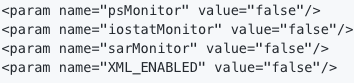
- Monitors: Set the following monitor parameters to false
-
Workloads
-
This example experiment uses workloads ranging from 1000 to 7000 concurrent requests
-
Lines like the one below can be modified by either changing the corresponding value or commenting out the line entirely
-

Important Notes
-
mysqlReponseTime parameter should remain “false.” The screencast accompanying these instructions sets this parameter incorrectly.
-
This file contains many additional parameters. A more complete description for most of them can be found at the end of the tutorial in the XML Configuration Parameters.
-
In the case of errors using the “open” command, refer to the following webpage on how to use vim: click here.
- You also have the option of editing the file locally and using scp command to transfer the file back to the server.
Generate Experiment Scripts and Configuration using Experiment XML
Experimental artifacts like the scripts and software configuration are created dynamically by the code generation pipeline. This pipeline can be executed using the following commands, substituting the values for and as provided in Step 2:
<code>ssh node1.
cd /proj/Infosphere//common/rubbosMulini6
</code>
Finally, open runRubbosExperiment.sh and substituting with the specified values
<code>BUILD_DIR = /proj/Infosphere/
OUTPUT_HOME =  from Step2
</code>
The script can now be run with the following command where corresponds to the name of the Experiment XML file from Step 2:
<code>./runRubbosExperiment.sh
</code>
In the case of our running example, this should be:
<code>./runRubbosExperiment.sh RUBBOS-1111-EMULAB-username.xml
</code>
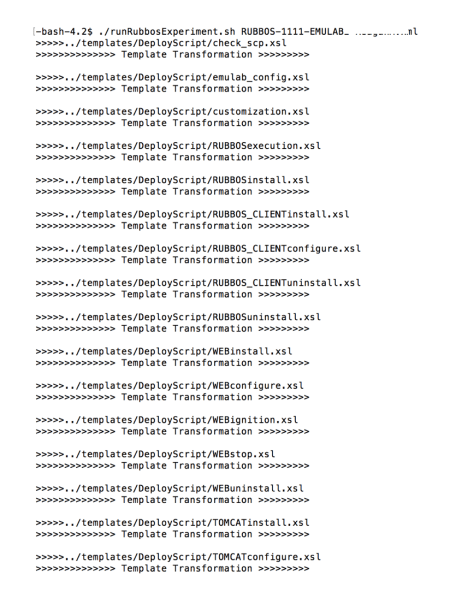
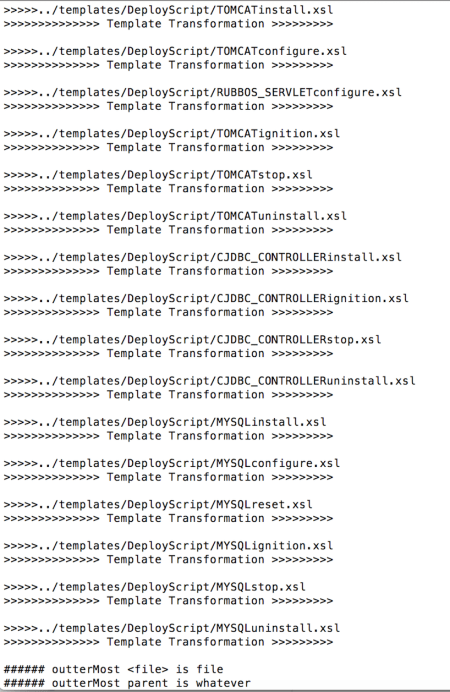
When running the code, your terminal may look like the following:
Important Notes:
-
Activating the experiment on emulab, (“swapping it in”) and logging into node1 is not a strict dependency. Since the image and emulab environment already have the proper environment variables set, this step ensures consistency during experiment generation.
- For clear instructions on how to “swap in” your experiment on Emulab, and other important details, please refer to ‘Emulab Tips’
-
The script should be run from a location that has the environment variable, JAVA_HOME, set. Nodes using the FC15RubOral image already have JAVA_HOME set. So, we recommend connecting to the Control node with ssh to execute this step.
-
Sample Experiment XML files are available in the
/examplesdirectory in our Github repository.
Code Generator Description
In general, our code generator is orchestrated by way of the runRubbosExperiment.sh script. This script calls a Java program, DeployScriptGenerator, which generates all of the necessary scripts and artifacts for executing an experiment in one of the supported infrastructures. The following describes the script more generally and the organization of the code generator source code:
- Code Generator Organization:
* Base directory, `../common/rubbosMulini6`, contains the aforementioned script. It also acts as a reference point for executing the code generator and pipeline.


* Two sub-directories house the code generator source and base artifacts:


  * `../rubbosMulini6/templates` - contains the XSL-based code templates that serve as a basis for the experiment scripts


  * `../rubbosMulini6/source` - contains the Java source code for the code generator
- Parameter Descriptions. The
runRubbosExperiment.shscript uses the following parameters in addition to those mentioned at the beginning of this Step. These might need to be altered depending on the environment used for generating experiments:
* MULINI_DIR: specifies the base directory of the code generator, i.e. `../rubbosMulini6`from above


* EXP_DIR: specifies the path to Experiment XML files, i.e. the location for the filename specified as a command line parameter
- Dependencies:
* Directories, `/templates` and `/source` need to be located in the same directory as the aforementioned script. Currently, all of these appear under `/common` in the source code repository under `/code_generator/`


* Value of `OUTPUT_HOME` parameter used in this script needs to be the same as the value of the `OUTPUT_HOME` parameter specified in the referenced Experiment XML file